 Read Aloud
The useful answer
First confirm the spelling and the voice’s language. Compare a short sample with another suitable voice. For personal listening, use a separate annotated copy if needed, while preserving exact names and wording in the original.
An unfamiliar sound does not always mean broken text
A speech voice reaches a person’s name and pronounces it differently from what you expected. The rest of the paragraph sounds normal. The problem may be an ambiguous spelling, a language mismatch, an acronym, or an actual error in the source.
Start by identifying which kind of problem you have. A name can have more than one accepted pronunciation, and a written form does not always tell a speech engine which one the author intended. Your expectation is useful evidence, but it is not automatically the definitive answer.
A practical workflow checks the text, the language, and a short comparison before changing anything. That keeps a small pronunciation issue from turning into a large set of unnecessary edits.
Verify the original spelling
Compare the displayed text with the source. If the passage came from a photo or scan, check whether recognition confused a letter, omitted an accent, or split the name across lines. If it came from a PDF, inspect whether the copied characters are actually the letters you see on the page.
A wrong character can produce a plausible but incorrect sound. Correcting the source copy is then more useful than finding a voice that happens to pronounce the mistake in a familiar way.
If the spelling is correct, leave the authoritative document unchanged while you investigate the voice. A personal listening preference should not silently alter formal names, citations, or product labels in the original text.
Match the language of the passage
A voice selected for one language may apply its usual pronunciation patterns to a name from another. Sometimes that remains understandable; sometimes it makes the passage difficult to follow. Check the language and regional label of the voice you selected.
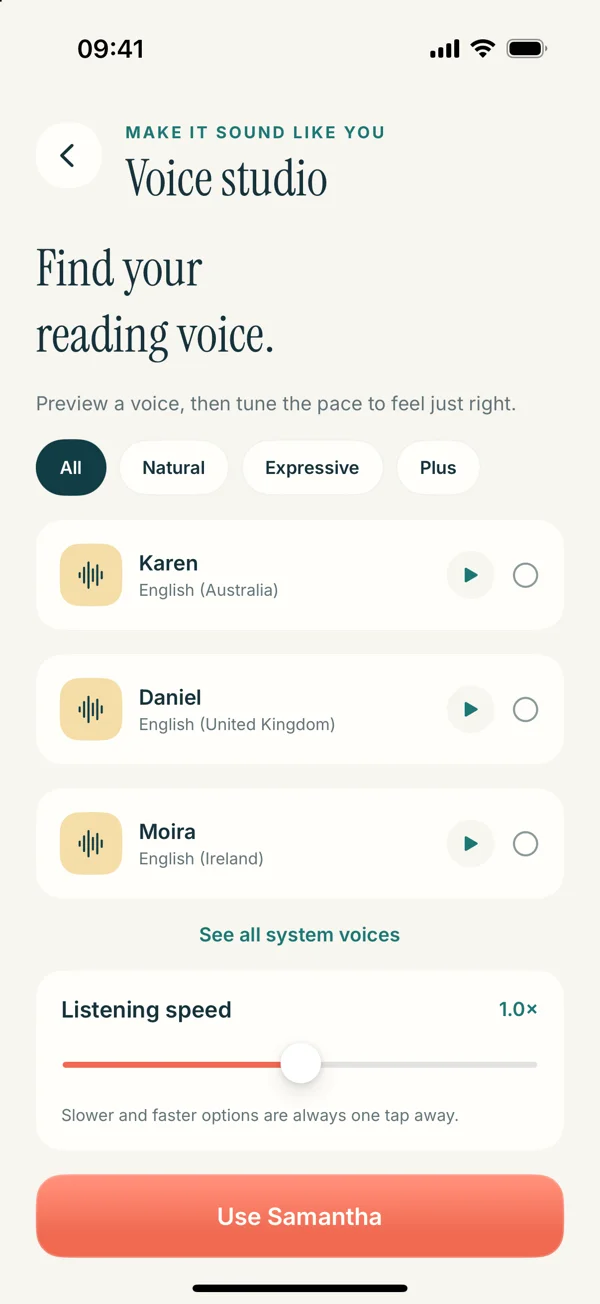
In the upcoming Read Aloud Voice studio, voice choices include identifying labels, and the app distinguishes system voices from optional paid Plus voices. Use the voice selection guide to compare appropriate options.
Do not assume that changing an iPhone system setting changes every app’s chosen voice. Start in the app that is actually speaking. If you are using a system reading feature, consult the relevant Apple settings; if you pressed play in Read Aloud, inspect its own voice selection.
Compare the same sentence with another suitable voice
Choose a short sentence containing the name and enough surrounding context to make the test realistic. Play it with another available voice for the same language, keeping the pace similar. This helps you hear whether the treatment is specific to one voice.
A comparison can give you a more comfortable reading option, but it does not establish which pronunciation is correct. For a name that matters, use an authoritative pronunciation source when available, such as the person’s own introduction or an official recording.
Avoid cycling endlessly through voices on a single word. Once you have an understandable option, test a full paragraph. The voice also needs to work for the rest of the material, not only the difficult name.
Distinguish names from abbreviations
An abbreviation may be intended as a spoken word or as separate letters. The written form may not make that intention obvious. A reader can therefore produce a result that sounds wrong for your context while following a reasonable pattern for the characters.
Before editing a listening copy, determine what the abbreviation means and how it is normally used in the source’s field. Do not expand an unfamiliar acronym from a guess. The surrounding document or its glossary may provide the answer.
For your own notes, you can write the full term the first time and preserve the abbreviation afterward. That often improves understanding independently of pronunciation. It is a note-preparation choice, not a claim that Read Aloud automatically expands acronyms.
Keep personal pronunciation notes separate
If a recurring name makes your own listening difficult, you may decide to prepare a separate copy with a pronunciation reminder or an expanded form. Label that version clearly and retain the exact original spelling alongside it or in the source.
Do not use a phonetic workaround in a document you intend to submit, quote, or publish unless that form belongs there for another reason. A change that helps one speech voice may look like an error to a human reader or confuse a different voice.
Read Aloud is not being advertised here as having a custom pronunciation dictionary or a universal phonetic markup system. The suggestion is manual preparation of a personal listening copy when that is useful and appropriate.
A worked example: a historical name in notes
Suppose your study notes contain a historical figure’s name that the selected voice makes difficult to recognize. First check the spelling against the course source. Then confirm that the voice’s language matches the passage.
Try another suitable voice on the same sentence. If the result remains distracting, you can add a brief note in your personal study copy identifying the person’s role when the name first appears. That context may make later occurrences easier to understand even if the pronunciation is not ideal.
Keep the correct spelling in the notes used for written work. When accuracy matters, consult an appropriate pronunciation reference. Do not turn an uncertain phonetic guess into the only form you retain.
A worked example: an acronym in a report
Imagine a report that repeatedly uses a three-letter abbreviation. The voice says it as a word, but your team usually says the letters separately. The text is correct; the difficulty is the spoken convention.
For a personal review copy, write the full term at the first occurrence and add context that keeps the meaning clear. If you experiment with spacing or punctuation in a listening-only version, test the result carefully rather than assuming every voice treats those characters the same way.
Leave the authoritative report’s terminology intact. If the abbreviation is confusing even to a human reader, consider a proper editorial change in the original, such as defining it on first use. That is a clarity decision beyond the speech engine’s behavior.
Check punctuation and line breaks around the word
A name split by an accidental newline or hyphen may be treated as separate fragments. A period inside an abbreviation may create an unexpected pause. Look at the surrounding characters before deciding the voice has a name-specific problem.
Copied text can also contain invisible or unusual spacing that makes the displayed phrase appear normal while the underlying sequence differs. Recreating a short passage as clean text can help diagnose that possibility, provided you compare the wording with the source.
The line-break cleanup article explains how to repair copy artifacts without flattening meaningful paragraphs. If the text came from a photo, the OCR photo guide addresses the earlier recognition stage.
Slow down when the context is unfamiliar
Even a reasonable pronunciation can be difficult to recognize in a fast stream of new names and terms. Reduce the pace and listen to the surrounding explanation. The problem may be unfamiliarity with the material rather than a single incorrect sound.
Pause to inspect a term when it matters. You do not need to keep the audio moving continuously to have a useful session. For reference-heavy or technical material, short segments with visual checks may be more appropriate than uninterrupted listening.
Use the speed calibration routine to test a representative passage. A comfortable pace should leave you able to follow relationships between ideas, not merely identify individual words.
Know when a pronunciation issue affects meaning
Some differences are mildly distracting but leave the text understandable. Others create ambiguity between two terms or make an instruction difficult to interpret. Prioritize the cases that change your understanding rather than trying to perfect every sound.
If a technical term or proper name is central to a decision, verify it in the written source. Audio should not become the only reference simply because it is convenient. The text remains available to resolve what you heard.
For a relaxed novel, you may decide that a consistent but unfamiliar pronunciation is acceptable. For a presentation you will deliver aloud, you may need an authoritative spoken model and your own rehearsal. Different tasks justify different levels of correction.
Report a reproducible problem when needed
If a voice repeatedly produces a clearly unusable result, a useful support report includes the app version, selected voice, language, a short non-sensitive sample, and what you expected. Say whether another voice behaves differently.
Avoid sending a whole private document when one sentence demonstrates the issue. If the example contains someone’s personal information, choose an appropriate substitute or describe the pattern without exposing unnecessary details.
A focused report helps distinguish text handling from a voice-provider behavior or a language-selection issue. “This voice reads this exact short sample this way” is easier to investigate than “the voices sound wrong.”
Aim for clear understanding, not endless correction
Check the source, match the voice, compare a sentence, and preserve exact text in the original. Use a separate listening copy only when a manual note or expansion makes the material more usable. Keep uncertainty visible rather than guessing at an authoritative pronunciation.
The upcoming Read Aloud interface is previewed in the guides, while the App Store currently offers version 1.0.2. View the app for release information and use the voice controls available in your version.
A useful listening session does not require every name to sound exactly as you imagined. It requires enough clarity to follow the content, plus a reliable way to inspect the words when pronunciation leaves a question.