 Read Aloud
The useful answer
Start with a comfortable pace, listen to a representative passage, and explain its main point. Increase or decrease speed in small steps. Use slower playback or pauses when the material needs more attention.
The useful speed is the one that fits the task
A reading app’s speed control can make it tempting to search for one ideal setting. But a familiar email draft, an unfamiliar research argument, and a chapter of fiction place different demands on the listener. The same number will not necessarily suit all three.
Begin with what you want to do. Are you skimming a document you already know, hearing a new explanation, or checking the rhythm of your own writing? The answer changes what counts as a useful pace.
This article offers a small calibration routine rather than a universal target. It does not claim that a particular playback speed improves learning or productivity. Your ability to follow the material is more informative than the maximum setting on a slider.
Choose a representative passage
Use a paragraph that resembles the rest of the source. A short, simple opening is a poor test for a chapter full of unfamiliar terms. Likewise, a list of references is not a fair sample of a novel’s ordinary prose.
Include the features that usually make the material demanding: long clauses, names, numbers, dialogue, or technical vocabulary. You do not need a long sample. You need one that exposes the kind of listening you will actually do.
Keep the same passage while comparing settings. If you change the source at the same time, an easier paragraph may make a faster speed seem better than it really is for the document as a whole.
Settle the voice before comparing pace
Different voices have different rhythms, pronunciations, and sentence timing. If you switch voice and speed together, it is difficult to tell which change affected comfort. Choose a suitable voice first, then adjust pace.
Match the language of the text and listen for whether names and punctuation are understandable. A voice mismatch may sound rushed or confusing even at a slow setting. The voice selection guide explains a consistent comparison process.
Read Aloud offers system voices and optional paid Plus voices. Check the app for current access and plan details. You can test the speed routine with an available system voice; a paid choice is not a prerequisite for deciding whether a passage is easy to follow.
Start comfortably and ask a concrete question
Play the sample at a pace that feels easy rather than impressive. When it ends, stop and state the main point in your own words. If the paragraph is an instruction, explain what you would do. If it makes a comparison, name the difference.
This is a more useful check than asking whether you recognized individual words. You can hear each word while losing the relationship between them. A short explanation reveals whether the sequence remained meaningful.
If you cannot answer, consider several causes: the pace, unfamiliar content, poor source text, or divided attention. Slowing down is worth trying, but it is not the only possible repair. The method should diagnose the problem rather than automatically blame the speed setting.
Adjust one small step at a time
If the sample is clear and you want a brisker review, increase the pace slightly and replay it. Compare comfort and understanding. If the new setting makes you mentally chase the previous clause while the next one begins, move back or add pauses.
Avoid jumping immediately from an easy setting to the fastest available one. A large change can tell you that the extreme is uncomfortable without helping you find a useful middle. Small comparisons provide more actionable information.
Once you find a workable pace, try a second representative passage that you have not just memorized through repetition. Familiarity with the test paragraph can make a fast setting seem easier than it will be on new material.
Separate listening speed from reading difficulty
A difficult paragraph may remain difficult at every speed because it introduces a new concept or assumes background knowledge. In that case, stop and inspect the source. Look up the term or work through the example before continuing.
A slow voice does not automatically explain an argument. It simply gives the words more time. Sometimes the useful change is a smaller section, a visual diagram, or a question that focuses your attention on the relationship you need to understand.
Our study-note routine suggests combining short listening segments with an explanation and source check. That approach can help you identify what is missing without treating playback speed as the only control that matters.
A worked example: reviewing a familiar draft
Suppose you wrote a short report and already know its content well. A moderately brisk first pass may help you hear the overall flow and repeated phrases. You are not learning the argument for the first time, so your review question is about structure or wording.
When a sentence sounds crowded, replay that passage more slowly. Check whether the difficulty comes from too many qualifications, a broken copied line, or an unclear transition. Make the edit in the original document rather than only changing the listening copy.
For the next revision pass, keep the voice and speed consistent so you can judge the writing change. The proofreading article explains how to separate a structure pass, a sentence pass, and a final visual check.
A worked example: reading an unfamiliar report
Now imagine a report with new terminology, dates, and several conditional claims. A pace that felt easy on your own draft may be too quick here. Begin more slowly and pause after sections where the author defines terms or qualifies a conclusion.
Keep the source available when the narration refers to a chart or table. The difficulty may be that the explanation relies on visual evidence, not that the voice is moving too fast. Look at the evidence and then return to the prose.
At the end of a section, describe what changed in your understanding. If you only remember isolated phrases, reduce the section length or change the reading method. A smaller useful review is better than a long session in which the argument never becomes clear.
Use pauses without treating them as failure
A continuous stream of speech is only one way to listen. Pausing to inspect a name, take a note, or think through an example is a normal part of working with text. You do not have to optimize for uninterrupted playback.
For dense material, a comfortable voice with frequent intentional pauses may work better than a very slow continuous setting. For familiar narrative, a steady pace may be more enjoyable. The source and your purpose determine the rhythm.
If you use bookmarks in the upcoming Read Aloud app, choose return points that answer a question. The bookmarking article explains how to avoid accumulating so many markers that none stands out as useful.
Do not mistake source errors for pacing problems
If the voice pauses after every printed line, inspect the text for accidental line breaks. If the narration jumps between unrelated sentences, check reading order. If it says menu labels in the middle of an article, inspect the extraction.
Changing speed can make those problems more or less noticeable, but it does not necessarily fix them. Use the line-break article, PDF order article, or web cleanup guide for the appropriate stage.
Once the source is clean, return to the speed comparison. You will be evaluating the actual reading experience rather than compensating for broken input.
Account for the listening situation
A setting that works in a quiet room may be uncomfortable when your attention is divided or the environment is noisy. Consider the activity, the audio output, and how much you need to inspect the source.
Some reading belongs at a desk because it requires decisions, detailed notes, or frequent visual reference. Other material is suitable for a relaxed listen. Choosing a different situation can be more effective than pushing the speed slider around.
Use your attention as evidence. If you keep losing the same section, pause and change something meaningful: the pace, the amount of material, the environment, or the reading method. Do not treat finishing the audio as proof that the session served its purpose.
Keep settings flexible across documents
You can have a comfortable starting pace without making it a rule. A novel, a report, and a set of instructions may each need different treatment. Adjust for the document in front of you rather than trying to maintain a personal record.
When you return to a saved item, test a short passage again. Familiarity, fatigue, and the section’s complexity may have changed since the previous session. A small recalibration is often enough.
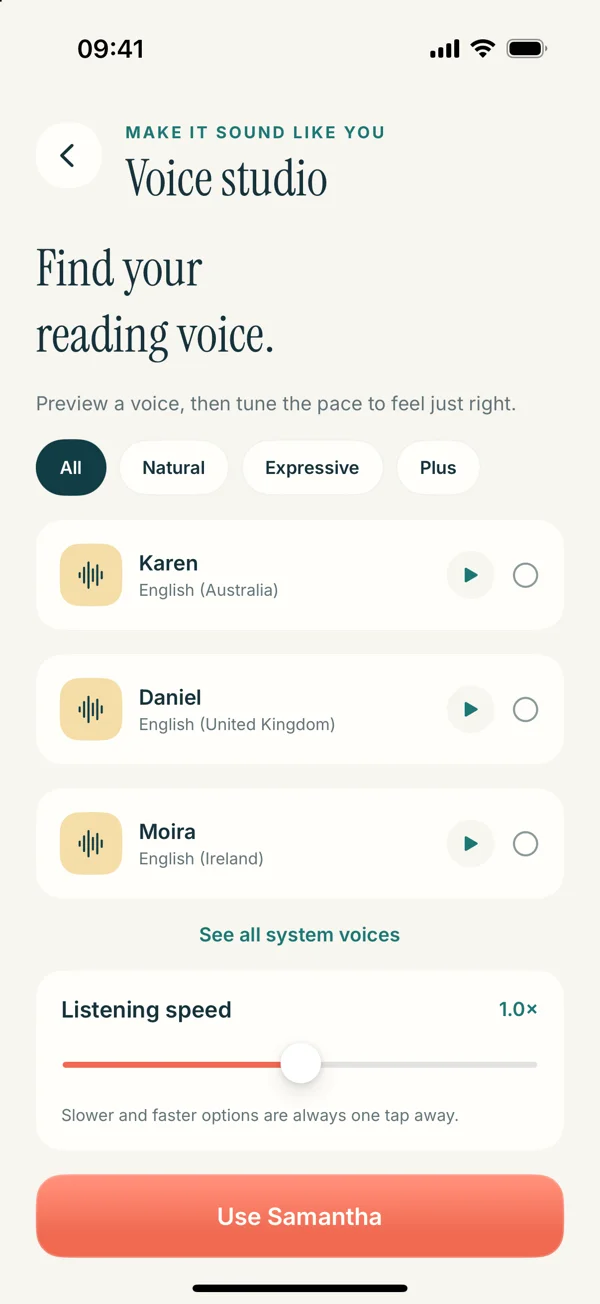
In Read Aloud’s upcoming Voice studio, the listening-speed control sits near voice selection. The detailed interface here previews 1.0.3; the current public version is 1.0.2. The app guide explains the overall listening route.
A simple routine to keep
Choose a representative paragraph, keep the voice constant, start comfortably, explain the point, and adjust in small steps. Then test an unfamiliar passage from the same source. If the material needs a pause or a visual check, give it one.
This routine avoids a false choice between slow and fast. The aim is a pace that supports the task, with enough flexibility to respond when the source changes. A number on a slider is only useful in relation to the words you are hearing.
Try Read Aloud with a piece of text you already have. Start with a small successful session and let comfort and understanding guide the next setting.